
Data is a valuable resource in the world of sports, especially in golf. Golf has seen a rise over the last number of years in golfers accessing more data, metrics, and statistics with a variety of golf training aids to help them become better players. More than ever, players are diving into the numbers to learn more about how they play, what they need to work on, and ultimately shoot better scores.
How To Use The Arccos System
Arccos provides all this and more with their Smart Caddie sensor system – a golf swing trainer that will analyze your shot and provide valuable insights to help you improve your game. With a set of small, lightweight sensors, this system automatically tracks every swing and tracks all the data you need. It pairs with the Arccos Caddie app on your smartphone so you can review all your numbers. From there you can see what you need to practice, track your club distances, and gain a deeper knowledge of how you play the game. TGW’s Master Fitter Rick Hatfield takes you inside this technology and shows you just how it works in three easy steps.
1. How To Install
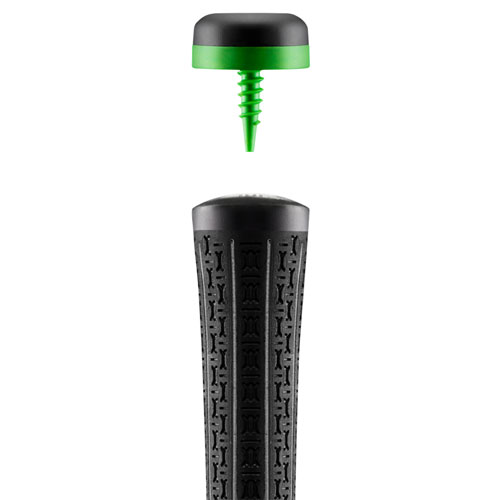
Step one in getting set up with the Arccos Smart Caddie system is to install the sensors. These simply screw into the hole in the top of the grips on your golf clubs. They are small and lightweight and do not change the swing weight, feel, or balance of your clubs.
Next, install the Arccos Caddie app on your smartphone. This app is available for both iOS and Android devices. Once you download the app, it will prompt you to set up an account and walk you through that process. The first year of access to the Arccos Caddie app is free with the purchase of a full set of sensors.
With the app installed and your account created, you will then tell the Arccos Caddie which clubs you installed the sensors on. The app has an extensive list of clubs available so you should have no problem finding the ones that are in your golf bag.
2. How To Pair
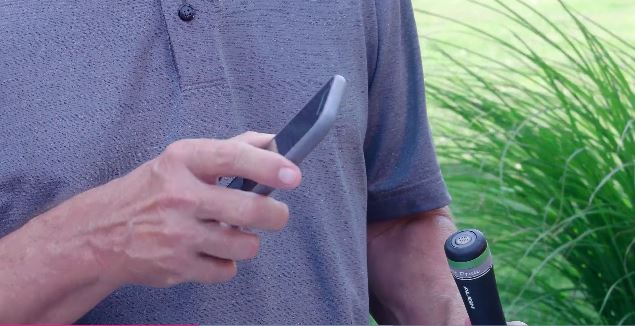
The next step is to pair your golf clubs with sensors installed on the Arccos Caddie app. After you have input the makeup of your club set in the app, tap the Start Pairing button. Remove the little sticker from the top of the sensor. Then, the app uses the camera on your phone to read the QR code shown on the top of the sensor. Simply point your camera at the top of the sensor and the app will recognize the sensor and assign it to the golf club you choose. Repeat the process for every golf club in your bag and you are ready to play.
3. How To Track

With all your sensors installed and paired with the app, you are ready to play. Open the Arccos Caddie app and tab the Start Round button. Using your GPS location, the app will automatically recognize the courses closest to you. If your course does not appear on the list, you can search for a specific course. Once you have found your course, tap Start Round.
As you play your round, all you need to do is keep your smartphone in your front pocket as you play. That proximity between the app and the sensors on your clubs will automatically track the metrics you need on every single swing you take. The app tracks where you hit each shot from and the results from distance to direction.
The Arccos Caddie app also acts as a GPS device. You can view distances to the green, hazards, doglegs, and more on full-color maps right on your device. It will even take into account wind speed, direction, barometric pressure, and temperature to show you the most accurate distances.
When your round is done, you can analyze how you played. The app will show you the average distance for each club, helping you better understand how your golf clubs are gapped and allowing you to make the best decision for each type of shot. It will also show you strokes gained analytics to show you which parts of your game you can focus your practice time to improve.

The sensors are swing weight neutral so they will not throw off the balance or feel of your golf clubs. Each battery is designed to last up to 5 years. When you buy a full set of sensors, you also get your first year of access to the Arccos Caddie app for free. The set of sensors includes 13 standard sensors and 1 putter-specific sensor. The app is compatible with both iOS and Android devices and is tournament legal under USGA rules.


